SLA Policies
An SLA policy defines backup requirements for your sources i.e. how often backups should be taken and how long they should be retained. When a policy is scoped to an environment and data class, Plakar Control Plane automatically creates backup schedules for all source apps that match.
flowchart TD
  subgraph Policy["SLA Policy"]
    Requirements["Frequency & retention"]
    Scope["Scope\n(environment, data class, tag)"]
    PolicyStore["Store app"]
  end

  subgraph Sources["Source Apps"]
    S1["Source A\nproduction · database"]
    S2["Source B\nproduction · critical"]
    S3["Source C\nstaging · database"]
  end

  Scope -->|"auto-match"| S1 & S2
  S1 & S2 -->|"schedule created"| Backup["Backup"]
  Requirements --> Backup
  Backup --> PolicyStore
Policies belong to a single organization. You work only with the policies of the organization you signed in to, and what you can do with them is determined by the permissions you hold there.
Creating a policy
A policy is created in two steps, its rules and then its scope. It needs a name, at least one retention tier with a store, an environment and at least one data class. Everything can then be changed later.
Rules
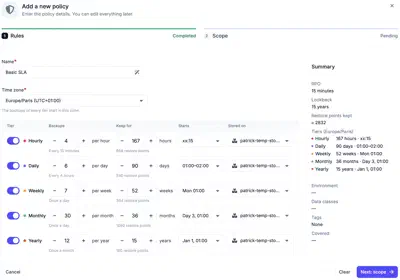
The rules define how often backups are taken, how long they are kept and where they are stored. They are set per retention tier:
- Hourly
- Daily
- Weekly
- Monthly
- Yearly
Any combination of tiers can be enabled. For each tier, you configure:
- Backups: how many backups are taken within the period of the tier, for example 3 an hour, which is one every 20 minutes.
- Keep for: how long the restore points of the tier are kept, for example 7 days.
- Starts: when the backups of the tier start. See Start time and window.
- Stored on: the store the backups of the tier are written to. Each tier can use a different store.
Start time and window
Each tier has a start, and the policy has one time zone that applies to every
tier. Starts follow the local clock of that zone, so a daily backup at 02:00 in
Europe/Paris runs at 02:00 Paris time in both summer and winter.
The Hourly tier starts at a minute past the hour, such as xx:30. The other
tiers start at a time of day. The Weekly tier also sets a day of the week, the
Monthly tier a day of the month, and the Yearly tier a month and a day. A month
without the chosen day, such as the 31st, runs on its last day. When a tier
takes several backups in its period, they are evenly spaced from the start. For
example, 4 backups a day starting at 01:00 run at 01:00, 07:00, 13:00 and 19:00.
A tier other than Hourly can start within a window, such as 02:00 to 06:00, instead of at a single time. Each source then gets its own start time inside the window and keeps it from one run to the next, so the sources of a policy do not all start against the same stores at once. Adding a source does not move the others. Changing the window gives every source a new time. A window can cross midnight, but it must be shorter than 24 hours and than the time between two backups of the tier. A Daily tier with 4 backups a day runs every 6 hours, so its window must be shorter than 6 hours.
When the clocks go forward, a start time that does not exist, such as 02:30, runs an hour later. When the clocks go back, a start time that occurs twice runs the first time.
Policies created before start times were available keep the hour they already run at until the start of a tier is changed.
Scope
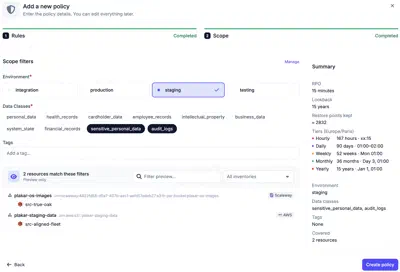
The scope selects the source apps the policy applies to:
- Environment: required.
- Data classes: required. One or more.
- Tags: optional. Narrows the match to sources whose resource carries at least one of the listed tags.
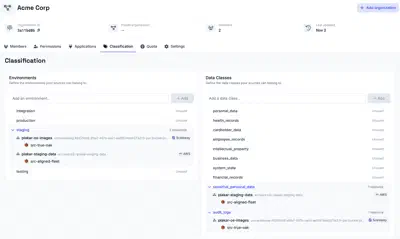
Environments and data classes are managed in the organization’s classification settings. A preview lists the resources and source apps the scope matches before the policy is created.
A matched source is only scheduled when it and its store share the same data residency.
Scopes can overlap, for example a general policy for all production sources and a stricter one for production databases. A source app matched by several policies follows the one with the lowest RPO.
Summary
The policy shows a summary of the contract it defines. The RPO is the maximum data loss window, based on the most frequent backup. The lookback is how far back data can be restored, based on the longest retention. The summary also shows the approximate number of restore points kept and how many resources the scope covers.
Scheduling
The policy scheduler creates a backup schedule for every source app the policy matches, using the store and start of each tier.
A policy selects source apps by classification, not by name, so it also covers source apps created later. When an inventory discovers a resource, a configuration bundle can create its source app, which takes its environment and data class from the tags of the resource. Plakar Control Plane re-evaluates the matches of each policy every 15 minutes, so a new source app is scheduled within that time. A source app that no longer matches any policy loses its policy schedules the same way. See Automating backups for the full setup.
Managing environments & data classes
Environments and data classes used by the SLA system to scope resources are managed per organization, from Organization -> Classification. From there, you can create new environments and data classes, or delete existing ones.
Because they belong to an organization, the environments and data classes available to a policy are the ones defined in the organization that policy lives in. See Managing Organizations for more information about how organizations isolate configuration.